
Java 25 is comming
Summer hollidays, as it seems, for many Java developers would mean waiting for an official release (or at least for a fianl RC) of Java 25 which is planned to be generally available on 16th September this year. In preparation of this moment lets go through what going on
You can go straight to javaalmanac.io Java 25 page for all the details, JEP links, API changes, release notes and vendors’ downloads.
This blog entry is just a summary and is intended for me just to clean up and gather thoughts. Feel free to move away from here and explore by your own!
Key changes
Out of all the JEP changes that go into Java 25 there are some of special importance to Java developers
| Content | Dev | JEP |
|---|---|---|
| Remove the 32-bit x86 Port | 😐 | JEP 503 |
| Scoped Values | 🥰 | JEP 506 |
| Key Derivation Function API | 😐 | JEP 510 |
| Module Import Declarations | 🥰 | JEP 511 |
| Compact Source Files and Instance Main Methods | 🥰 | JEP 512 |
| Flexible Constructor Bodies | 🥰 | JEP 513 |
| Ahead-of-Time Command-Line Ergonomics | 😀 | JEP 514 |
| Ahead-of-Time Method Profiling | 😀 | JEP 515 |
| JFR Cooperative Sampling | 🫣 | JEP 518 |
| Compact Object Headers | 🥰 | JEP 519 |
| JFR Method Timing & Tracing | 🫣 | JEP 520 |
| Generational Shenandoah | 🥰 | JEP 521 |
Legend
- 🫣 - I don’t know much about JFR
- 😀 -AOT is interesting
- 🥰 - life will be easier
- 😐 - I don’t think this will affect me
Schedule
Source: https://openjdk.org/projects/jdk/25/
| Date | Phase | |
|---|---|---|
| 2025-06-05 | Rampdown Phase One (branch from main line) | |
| 2025-07-17 | Rampdown Phase Two | |
| 2025-08-07 | Initial Release Candidate | |
| 2025-08-21 | Final Release Candidate | |
| 2025-09-16 | General Availability |
If anyone is interested in support from Oracle, they should pay close attention to the Roadmap published on https://www.oracle.com/java/technologies/java-se-support-roadmap.html page:
Oracle Java SE Support Roadmap
Installation (Ubuntu)
On Ubuntu you can apt install openjdk-25-jdk:

You can easily check where it was installed with dpkg -L openjdk-25-jdk:

To set java 25 as your default, you could
- set your JAVA_PATH in .bashrc/.zshrc or
- use update-alterantives - see Bozhidar Batsov’s old and good article on Workign with Multiple Versions of Java on Ubuntu
- default to most recently installed version
I checked my current java:
|
|
And decided to replace it completely with java 25 (when I removed the snap, newly installed openjdk-25 should become the default):
|
|
And then I could run a Java25 application (with some features still in preview - see below) - Colors.java which is using implicitely declared classes:
|
|

Preview features
I could see what exactly is causing the compliter requrie enabling preview versions by setting -Xlint:preview compiler (javac) argument. Using java runner, as above, only issues warnings from main script (Colors.java) and not from other classes (Printer.java).
IO and implicit classess are still in preview:
|
|
Completed features
Module import declarations
See: JEP 511 (and JEP 512 - compact source files) We can run small programs:

We can use JShell with automatically imported module java.base (today it is still under –enable-preview flag):
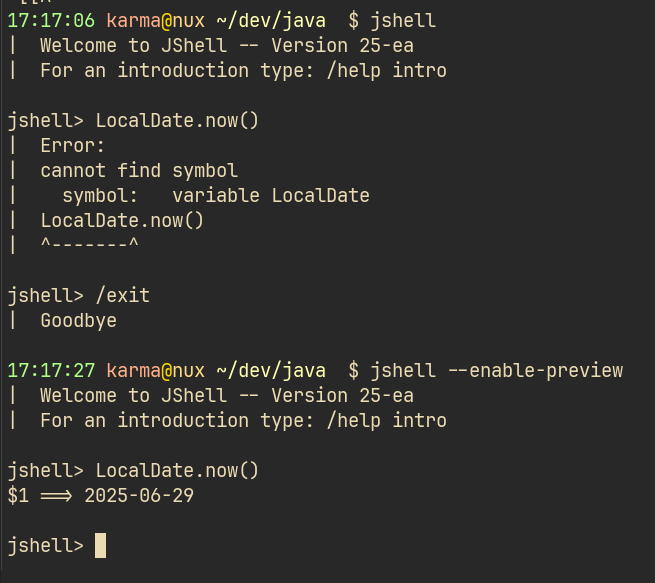
When the programs get a bit bigger, we can:
- import whole modules (and by transitive, open access, be able to use exposed classess/packages in them) - in particular, I can
import module java.basewhich would significantly imp. And not only that - as this JEP is co-developed with JEP 512 I will be able to use them by default - use compact source file which does not require such imports.
So, instead of this:
|
|
…I can now use this:
|
|
Happy hacking!